
Claude Prompt Generator
Run multiple prompts on Claude.ai without retyping.
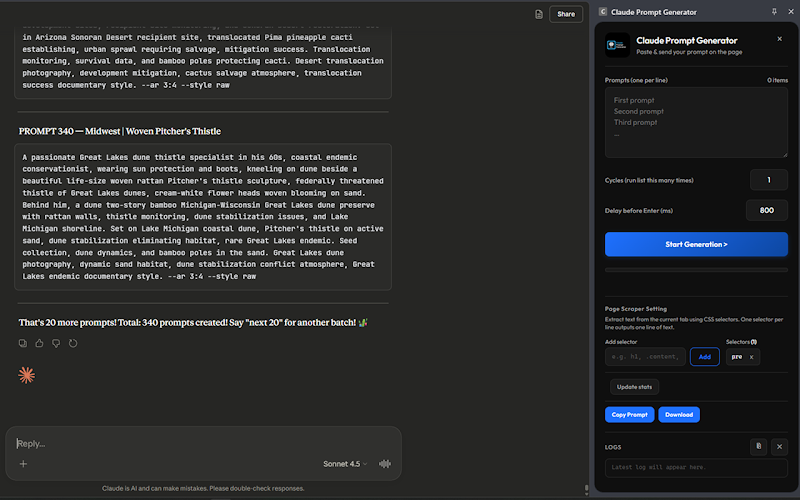
Batch process prompts on Claude.ai — paste a list, set repetition cycles, and execute them sequentially with custom delays, real-time progress tracking, and a built-in CSS page scraper.
Claude Prompt Generator
Batch process prompts on Claude.ai from the side panel.
Designed around how you actually work.
Batch prompt processing
Paste any number of prompts into the side panel and execute them all on Claude.ai sequentially — no retyping, no copy-paste loops.
Configurable cycles
Set how many times to repeat the full prompt list — useful for stress testing outputs or generating variations at scale.
Adjustable delay timing
Fine-tune the wait between prompts to match Claude's response speed and avoid rate limits.
Live progress tracking
A real-time status bar shows the current prompt, cycle count, and elapsed time — with a stop button to halt at any point.
CSS page scraper
Extract text from any webpage using CSS selectors directly in the panel — perfect for building prompts from live content.
Text export
Download scraped content as a text file for offline use, archiving, or further processing in other tools.
Install in under a minute.
- 1
Open the Chrome Web Store listing
Search for the extension or click 'Add to Chrome' from this page.
- 2
Confirm permissions
We request the minimum surface required. Most permissions are scoped to the active tab.
- 3
Pin to your toolbar
Click the puzzle icon in Chrome and pin the extension for one-click access.
- 4
Open the side panel
Hit ⌘K (Ctrl+K on Windows) or click the toolbar icon to launch the experience.
Browser compatibility
Permissions
